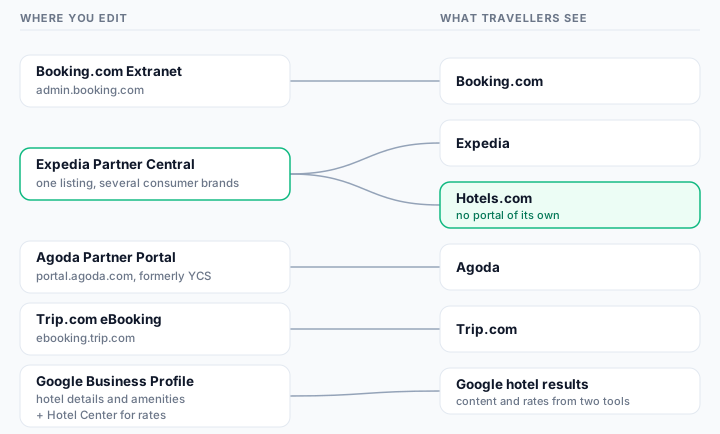
Hotel OTA extranet directory: which portal controls each listing
Travellers compare your hotel across six public surfaces. You edit that content in five partner portals — and the mapping between the two is not one to one. This directory records who owns what, using each platform's own documentation, so a correction lands in the right place the first time.
Every portal name, address and quotation below was checked against primary sources on . Portal menus change; the linked help article is always the authority.
The short answer
Booking.com content is edited in the Booking.com Extranet at admin.booking.com. Expedia and Hotels.com are both fed by one Expedia Partner Central listing — Hotels.com has no extranet of its own. Agoda content lives in Agoda Partner Portal at portal.agoda.com, the platform formerly called YCS. Trip.com content is edited in eBooking at ebooking.trip.com. Google splits the job in two: hotel details and amenities come from a verified Google Business Profile, while rates and availability come from Hotel Center.
What most operators get wrong
Five portals, six public surfaces. “I fixed it” and “it is fixed everywhere” are different statements, and only the second one is what a guest experiences.
Hotels.com is a distribution brand, not a portal. Expedia Group states that your listing will appear on brands including Expedia.com and Hotels.com, so one edit has to be verified on more than one page.
Agoda can show photos you never uploaded to Agoda. Its own help centre says the images displayed include those you uploaded to Booking.com and Priceline.
Booking.com writes your description for you. It generates the property description from the structured details you supply, so editing prose is not the lever — the underlying facility, room and location fields are.
Google separates content from commerce. Amenities sit in Business Profile; rates sit in Hotel Center. Hotels that treat Google as one login usually find one half unowned.
The portal-to-listing map
Read this diagram from left to right: the portal you log in to, and the public page a guest ends up reading. The one crossing in the middle — Partner Central feeding two consumer brands — is where most unverified fixes quietly fail.
Five portals, six public surfaces. Scroll horizontally on a narrow screen, or read the same mapping in the table below.
Public hotel listing surfaces, the partner portal that controls each one, and whether the brand has a portal of its own
“Scanned” marks the channels a free MisMatchMaker check reads. Google is included in this directory because hotel teams have to maintain it, not because the scanner compares it.
Find your listing
Pick the page that is showing the wrong detail and this tells you where to go.
Booking.com
Booking.com Extranet
Edit Booking.com content in the Booking.com Extranet at admin.booking.com. It feeds one public brand, so a change here does not touch any other channel.
One entry per portal: the address to type yourself, what its own documentation says it controls, what it deliberately does not, and the navigation paths each platform publishes openly. Where a platform keeps its steps behind a sign-in, this page says so instead of guessing.
One portal for one public brand, which makes Booking.com the simplest mapping on this page. The subtlety is not where the fields live but how they are used: Booking.com assembles your written description from the structured details you supply, so the lever for a wrong sentence is usually a facility, room or location field rather than a block of prose.
“Booking.com then generates your property description using a tested format and translates it into supported languages.”
Controls
Property name, location and address
Facilities, services and room-level amenities
Room and unit names and details
Photos, including which image is the main one
House rules such as arrival times, pets, parking and internet
Cancellation policies and meal-plan setup
Does not control
Your Expedia, Hotels.com, Agoda or Trip.com pages
Google's hotel details or Google rates
The description wording as free text — Booking.com generates it and documents a correction request route instead
Where each field lives
Content fields and their documented location in Booking.com Extranet
Field
Documented location
Source
Property name
Property tab → General info → Change property name
Booking.com describes two-factor authentication on partner accounts: if your username and password are compromised, a unique verification code is sent to your mobile device and must be submitted before access is granted. Because partner account takeover is, in Booking.com's words, "frequently a result of phishing", type admin.booking.com yourself rather than following a link in an email or message that asks you to sign in.
Documentation gap: Booking.com publishes the navigation path for the property name openly; most other field paths sit inside help articles that render their steps after you open them, so the linked article is the authority rather than a path repeated here.
The highest-leverage portal on this page, and the one operators most often misread. There is no Hotels.com content portal: Expedia Group distributes a single listing to its consumer brands, so a wrong breakfast line on Hotels.com is corrected in Partner Central and then has to be re-checked on every brand you care about.
“Our easy-to-use platform, Partner Central, will be the primary location for managing reservations, loading inventory, changing rates, and keeping your listing up to date.”
Controls
One property listing distributed across Expedia Group consumer brands
Reservations, inventory and rates
Listing content, including property details and photos
Policies such as cancellation terms
Promotions, campaigns and review responses
Does not control
Booking.com, Agoda or Trip.com pages
Google hotel details
Brand-by-brand content overrides — the listing is managed once, then distributed
Where each field lives
Content fields and their documented location in Expedia Partner Central
Field
Documented location
Source
All listing content
Expedia Group's per-field help articles load their steps only for signed-in partners, so no public navigation path can be quoted here — open the help centre from inside Partner Central
Sign in at expediapartnercentral.com, where the page identifies itself as "Welcome to Partner Central". If you manage several properties, confirm you are on the right property before editing, because one account can reach many listings.
Documentation gap: Expedia Group publishes far less openly than Booking.com or Agoda: its content help articles require a partner sign-in, so this directory links the public help entry point rather than inventing menu names.
Agoda documents its portal paths more openly than any other channel here, which makes it the easiest place to verify a fix — and it also documents the single most surprising content rule on this page: some of the photos on your Agoda page may never have been uploaded to Agoda at all.
“The photos displayed on your Agoda listing will include those you provide on Partner Portal as well as any images you uploaded to Booking.com and Priceline.”
Controls
General property information
Facilities and amenities, at property and room level
Photos, tags and the main image
Cancellation policies and rate plans
Rates and availability
Does not control
Any non-Agoda listing
Which Booking.com or Priceline images Agoda chooses to display
Google hotel details
Where each field lives
Content fields and their documented location in Agoda Partner Portal
Field
Documented location
Source
Facilities and amenities
Property → Property settings (hotels and multi-unit homes); Property → Amenities for single-unit homes
Agoda's Partner Hub describes Partner Portal as "Agoda's extranet through which you can manage your property, including rates and availability", reached at portal.agoda.com. Agoda also documents a propagation delay worth planning around: after changing facilities, it can take up to 6 hours for the change to appear on the website.
Trip.com confirms that property details are maintained in eBooking after you go live, but its public material leads with commercial tooling — reservations, rates, promotions and reviews. Treat the content fields as present but under-documented in public, and verify each change on the live page rather than trusting the form.
“Once your property goes live on Trip.com, you can update your details in eBooking at any time.”
Controls
Property details, content and photos after going live
Reservations and order processing
Room rates, availability and room status
Promotions and marketing campaigns
Guest reviews and add-on products
Does not control
Any non-Trip.com Group listing
Google hotel details
Where each field lives
Content fields and their documented location in Trip.com eBooking
Field
Documented location
Source
Property details and photos
Documented as editable in eBooking after going live; Trip.com's step-by-step articles sit inside the signed-in eBooking help centre
Sign in at ebooking.trip.com, choosing your language before entering credentials. Trip.com describes eBooking as a platform to "manage the reservations, room rates and availability, and revenues efficiently", so content work shares the portal with commercial work — a good reason to separate the two in your own checklist.
Documentation gap: Trip.com does not publish field-level navigation paths on its open marketing pages, so this directory records the confirmed capability and links the public entry point instead of paraphrasing gated steps.
Google is the one surface on this page whose content and commerce live in two different products. Amenities and hotel details come from a claimed and verified Business Profile; rates and availability come from Hotel Center. Hotels that treat Google as a single login usually find one half of it unowned.
“If you have a verified hotel Business Profile, you can edit your services and amenities in the "Hotel details" section.”
Controls
Hotel details and amenities, through Business Profile
Hotel highlights shown next to your amenities
Rates, availability and other booking-link data, through Hotel Center
Does not control
Any OTA listing — Google shows OTA prices but does not edit OTA content
Amenities via spreadsheet upload, which Google documents as unsupported for hotel attributes
Where each field lives
Content fields and their documented location in Google Business Profile (plus Hotel Center)
Field
Documented location
Source
Amenities and hotel details
Business Profile → Hotel details → search for the attribute → Save
Google requires a claimed and verified hotel Business Profile before you can edit all amenities from the dashboard, so verification is the prerequisite rather than an afterthought. Hotel Center is a separate product with its own access, which is why content and rate ownership so often sit with different people.
Why a fix in the right portal still leaves a mismatch
Knowing the portal is necessary but not sufficient. Four documented properties of this map explain most of the mismatches that survive a careful edit.
1. One portal, several public brands
Expedia Group describes a single listing appearing across its consumer brands, and names Expedia.com and Hotels.com among them. The practical consequence is that you cannot confirm a Partner Central edit by checking one page. If your team has only ever verified on Expedia, Hotels.com is an unverified channel — and it is a channel guests actually read. Expedia Group
2. Shared photo pools across corporate families
Agoda documents that the photos shown on your Agoda listing include images you uploaded to Booking.com and Priceline. So the image you deleted in one portal can persist on a page controlled by another, and the correct fix may be in a portal you were not editing at all.
3. Generated text versus typed text
Booking.com generates your property description from the details you supply and translates it into supported languages. When a sentence is wrong there, rewriting prose is not an available lever: the fields behind it are. Portals that build public copy from structured data reward operators who fix data, not wording.
4. Content and commerce split across tools
On Google, amenities live in Business Profile while rates and availability live in Hotel Center. Two products means two access paths, and in most hotels it also means two owners — often marketing for one and revenue or a connectivity provider for the other. Unowned halves drift.
A content directory is also an access directory, and partner portals are a known phishing target. Booking.com describes partner account takeover as frequently the result of phishing, and warns partners to watch for emails, texts or messages containing links or attachments that ask them to sign in or enter personal or financial information.
Type the portal address yourself — admin.booking.com, expediapartnercentral.com, portal.agoda.com, ebooking.trip.com — rather than following a link in a message that asks you to sign in.
Keep two-factor authentication on. Booking.com sends a verification code to your mobile device that must be submitted before access is granted, which is what stops a leaked password becoming a takeover.
Claim and verify before you expect to edit. Google requires a claimed and verified hotel Business Profile before all amenities can be edited from the dashboard.
Check you are on the right property before saving. One Partner Central or Partner Portal account can reach many listings, and a correct edit on the wrong property creates two problems.
Review who holds access each quarter, including agencies and former staff, and remember that Hotel Center access is separate from Business Profile access.
Six steps that turn this map into a repeatable correction, rather than an edit you hope worked.
1
Read the public page, not the form
Open the live listing a guest sees and copy the exact wording of the detail that is wrong. The portal field may already look correct while the public page disagrees.
2
Map the listing to its portal
Use the directory above. Booking.com, Agoda and Trip.com resolve to one portal each; Expedia and Hotels.com resolve to the same Partner Central account; Google resolves to Business Profile for content and Hotel Center for rates.
3
Change the structured field, not the prose
Booking.com generates its property description from the details you supply, so the lever for a wrong sentence is usually a facility, room or location field. Agoda separates property-level from room-level amenities, so pick the right level.
4
Respect the documented delay
Agoda states that facility changes can take up to 6 hours to appear on the website. Note whatever each portal tells you, and schedule the re-check after that window rather than refreshing immediately.
5
Re-check every brand that portal feeds
A Partner Central edit is one edit but several public pages. Confirm the Expedia page and the Hotels.com page separately before you call it done.
6
Re-compare across channels
Fixing one channel can leave it disagreeing with the others, so the last step is always a cross-channel comparison rather than a single-page check.
Step six, done for you
You now know which portal owns which page. A free check does the comparison: it reads your live Booking.com, Expedia, Hotels.com, Trip.com and Agoda listings, shows where breakfast, arrival times, pets, parking and fees disagree, and quotes the source text for each field so you know exactly which portal to open next.
This page deliberately stops at ownership. What each field should say, how platforms differ in wording it, and which values are most often contradicted are covered field by field in the guides below rather than repeated here.
Content fields, the portal areas that usually hold them, and the guide covering the field in depth
Not a channel-manager comparison. It records who owns each field, not which vendor can push it for you.
Not about rates or parity. Every portal here also handles commercial settings; this page is strictly about the content a guest reads.
Not a substitute for each platform's help centre. Menu names change without notice, so the linked article is the authority and this page records the date it was checked.
Not a credential store. MisMatchMaker reads public listing pages and never asks for portal access.
Frequently asked questions
Is there a Hotels.com extranet for hotels?
No. Hotels.com is an Expedia Group consumer brand rather than a separate partner portal. Expedia Group states that your listing will appear on brands including Expedia.com and Hotels.com, and that Partner Central is the primary location for keeping that listing up to date — so a detail that is wrong on Hotels.com is corrected in Expedia Partner Central and then re-checked on each brand page.
What is Agoda's extranet called now, YCS or Partner Portal?
Agoda's current documentation calls it Partner Portal and describes it as "Agoda's extranet through which you can manage your property, including rates and availability", reached at portal.agoda.com. YCS — the Yield Control System — is the older name that still appears in help-article URLs and in the way many operators talk about it, so both names refer to the same job.
Which portal controls the hotel information Google shows?
Two of them. Google Business Profile holds hotel details and amenities, and Google documents that you edit services and amenities in the "Hotel details" section of a verified hotel Business Profile. Hotel Center is the separate platform Google describes for managing rates, availability and other data used in ads and free booking links. Content and commerce therefore have different owners and different logins.
Do I need a separate login for every OTA?
You need one per portal, not one per listing. For the five listings this scanner reads, that is four portals: the Booking.com Extranet, Expedia Partner Central for both Expedia and Hotels.com, Agoda Partner Portal and Trip.com eBooking. Add Google Business Profile, and Hotel Center if you feed rates to Google.
Why can a photo appear on Agoda that I never uploaded there?
Because Agoda documents that the photos displayed on your Agoda listing include those you provide in Partner Portal as well as any images you uploaded to Booking.com and Priceline. If an outdated room photo survives an Agoda clean-up, check whether the same image is still live on your Booking.com listing.
How do I find out which portal is causing a wrong detail?
Start from the public page rather than the portal. Compare the same field across your live listings, note exactly which channel disagrees, then open the portal that owns that channel using the directory above. A free MisMatchMaker scan does the comparison step for you across supported channels and shows the original source text for each field it reads.
Sources
Primary documentation from each platform, all checked on . Where a platform publishes no public detail for a field, the entry above says so rather than filling the gap.