Reference

    Hotel accessibility information across OTAs: which fields exist, and where the detail is lost

    Every other listing field fails by costing somebody money. This one fails by stranding a person at the kerb — and it is the field with the least shared structure across channels. One of the five models reviewed here names a separate field for the shower, the bathtub, the toilet, the lift, the pool hoist and the fire alarm. The others resolve the entire subject to one or two entries inside a general facility list, and one publishes nothing at all. This page records what each platform's own documentation lets a hotel say, maps it against the seven facts a disabled guest actually has to establish, and gives you a repeatable way to find out what your own listings currently promise.

    Every field name, definition and quotation below was checked against primary sources on . Where a platform publishes nothing retrievable, the entry says so instead of guessing.

    The short answer

    There is no shared definition of an accessible room and no shared field set to put one in. Google's lodging schema is the outlier: around a dozen named fields, including separate ones for an accessible shower, bathtub and toilet, and the only hearing-access vocabulary in the set — a hearing-accessible unit, doorbell and fire alarm. Expedia Group's content reference lists name a general accessibility amenity plus accessible parking and an accessible wheelchair, available at property, room or rate level. Booking.com models access as an entry in a general facility list whose only documented attributes are whether it is paid and whether it is off-site, with structured detail objects for internet, parking, restaurant and swimming pool but not for access. Agoda's published facilities guidance names two groups, Property services and Sports and recreation, and no accessibility group. Trip.com publishes nothing retrievable at all. Not one of the five carries a door width, a turning circle or a grab-bar field — so the detail that decides the booking has to live in free text on every channel.

    What most operators get wrong

    • Treating “accessible” as a fact. It is a category, and Booking.com says so itself in its own traveller article: the meaning varies from hotel to hotel. Two listings that both say accessible are not consistent in any useful sense.
    • Ticking the box and stopping. The standard a reservation description is held to in the US is whether a disabled traveller can assess the room independently from what you wrote. A single flag is not a description, and it never will be.
    • Declaring one adapted room at property level. Property-wide and room-level accessibility are separate scopes on three of these models — put it in the wrong one and either the whole building reads as adapted, or your one good room never reaches a filter.
    • Assuming an empty field is neutral. On a channel with many accessibility fields, a blank is read as a no by every guest filtering on it. The better the model, the more an un-maintained listing costs you.
    • Forgetting the assistance animal. It is not a pet, but the pet field is the only animal field most channels have — so a correct “no pets” policy reads to a guide-dog owner as a refusal unless you say otherwise inside that same policy.
    • Expecting a channel manager to reconcile it. There is no lossless translation between a dozen named fields and one facility tick, so there is often nothing faithful to push. This is a manual job with a written specification behind it.

    Seven facts, not one checkbox

    Separate these before you compare anything. They are established by different evidence, fail in different ways, and are answerable from a listing page to very different degrees. The last line of each card is honest about what a MisMatchMaker scan does with the fact, which in every case here is nothing.

    The route from the street to the desk

    Not compared by a scan

    Can I get in without using a step?

    What it decides
    Whether the building is usable at all. A step-free approach, the entrance door, the threshold and the path to reception are a single chain, and the chain is only as good as its worst link. Google's model folds this into one property-wide flag whose own description names ramps and auto-opening doors, which tells you the platform treats the whole approach as one yes-or-no answer.
    How it fails
    A property flagged as accessible because the lift is accessible, reached by two steps from the pavement. Nothing on any listing contradicts it, and the guest discovers the gap with their luggage on the kerb. This is the single most common accessibility complaint pattern operators report, and the listing is usually not lying — it is answering a coarser question than the one the guest asked.
    Where a guest finds it
    A guest can usually establish this from the listing page
    Nearest field a scan does read
    Not compared. A scan reads parking, breakfast, pets, Wi-Fi, arrival times, fees and cancellation terms, none of which describe the approach to the door.

    Door widths and turning space

    Not compared by a scan

    Will my chair fit through the door and turn once it is inside?

    What it decides
    Whether an accessible room is accessible to this guest's equipment. A powered chair, a manual chair and a walker need different clear widths and different turning circles, and the difference between 75 cm and 90 cm of clear opening decides the booking. None of the five models reviewed publishes a width or a turning circle at all: the finest available answer is a boolean.
    How it fails
    A room sold as adapted with a 70 cm bathroom door. The hotel believes the room is accessible, the platform has no field in which the width could have been stated, and the guest has no way to have found out. The failure is structural rather than careless, which is why the fix is a written specification the hotel keeps itself.
    Where a guest finds it
    A guest has to contact you to establish this
    Nearest field a scan does read
    Not compared, and not comparable from a listing page: no channel publishes a dimension for a scan to read.

    How the bathroom works

    Not compared by a scan

    Roll-in shower, transfer shower, or a bath I cannot use?

    What it decides
    Most of whether the room is usable overnight. A roll-in shower, a shower with a transfer seat and a bathtub with grab rails are three different rooms for a wheelchair user, and only one of the five models separates them — Google's schema carries distinct unit-level fields for an accessible shower, an accessible bathtub and an accessible toilet.
    How it fails
    “Accessible bathroom” on every channel, a bath with a rail in the room. The word covered a promise the guest read as a roll-in shower. Grab bars are the sharpest version of the problem: they appear in no named field in any of the five models, so a hotel that has them cannot prove it and a hotel that lacks them is not contradicted.
    Where a guest finds it
    A guest has to contact you to establish this
    Nearest field a scan does read
    Not compared. The scan has no bathroom fields; the closest thing it reads is the general amenity list, which covers a pool, a gym and air conditioning.

    Alarms, doorbells and captions

    Not compared by a scan

    Will I know if the fire alarm goes off while I am asleep?

    What it decides
    Whether a deaf or hard-of-hearing guest is safe in the room, not merely comfortable. US accessibility standards treat this as its own class of guest room, with its own count and its own dispersion rule — rooms with communication features are specified separately from rooms with mobility features.
    How it fails
    A hotel with visual fire alarms and a vibrating pillow alarm that cannot say so on four of the five models on this page, and a hotel with neither that is never asked. Access for hearing-impaired guests is the largest documented hole in OTA listing content: one of the five models reviewed here has fields for it, and the other four have no retrievable field at all.
    Where a guest finds it
    Most channels have nowhere to publish this at all
    Nearest field a scan does read
    Not compared, and no channel the scan reads publishes a field for it, so there would be nothing to compare one listing against on another.

    A designated bay you can actually use

    Not compared by a scan

    Is there a marked accessible space, on site, that I can book?

    What it decides
    Whether the guest can arrive by car at all, which for many disabled travellers is the only way they travel. The fact has three parts a listing usually collapses into one: that the bay is marked and enforced, that it is on site rather than in a nearby public car park, and that it can be reserved rather than hoped for.
    How it fails
    Accessible parking shown as available, in a municipal garage 200 metres away, up a kerb. Booking.com's facility model can mark a facility as off-site, so the distinction is expressible there and frequently not used; nothing requires a channel to publish the distance.
    Where a guest finds it
    A guest can usually establish this from the listing page
    Nearest field a scan does read
    Parking availability, price and type are compared across channels — but only as parking. A scan can tell you two listings disagree about parking; it cannot tell you either one promises an accessible bay.

    The lift, and the route to everything else

    Not compared by a scan

    Can I reach the restaurant, the pool and the lift car itself?

    What it decides
    Whether the guest gets the stay the other guests get, which is the point of the dispersion rules in accessibility standards: accessible rooms are meant to offer comparable choices, not a single room next to the bins. A lift that exists is not a lift that works — Google's definition of an accessible lift is explicitly about door width and call-button placement.
    How it fails
    “Lift” ticked, call buttons at 140 cm. Or a pool listed with its opening hours and payment model and no statement about whether there is a hoist — a hoist is a named field in exactly one of the five models. The guest pays for a facility they can look at.
    Where a guest finds it
    A guest can usually establish this from the listing page
    Nearest field a scan does read
    The scan compares whether a pool, a gym and air conditioning are claimed, not whether any of them can be reached or entered.

    Equipment on loan, and service animals

    Not compared by a scan

    Can I borrow a chair, and will my assistance dog be treated as a pet?

    What it decides
    Two small facts that reverse a booking decision. A wheelchair the property lends can remove the need to travel with one; a pet policy applied to an assistance dog can make the hotel unbookable. Google names a wheelchair-rental field and says it can be free or charged; Expedia's reference lists name an accessible-wheelchair amenity and treat amenities as complimentary unless a surcharge or restriction is stated.
    How it fails
    A pet fee quoted for an assistance dog, or a “no pets” listing read as a refusal. An assistance animal is not a pet in either of the standards cited on this page, but the listing field it collides with is the pet field — and a pet policy is one of the fields that genuinely does differ across a hotel's channels.
    Where a guest finds it
    A guest can usually establish this from the listing page
    Nearest field a scan does read
    Pets allowed, pet fees and pet restrictions are compared across channels. That is the field an assistance-animal mismatch will surface in, which makes it the one accessibility-adjacent conflict a scan can find.

    Which channel has a field for which fact

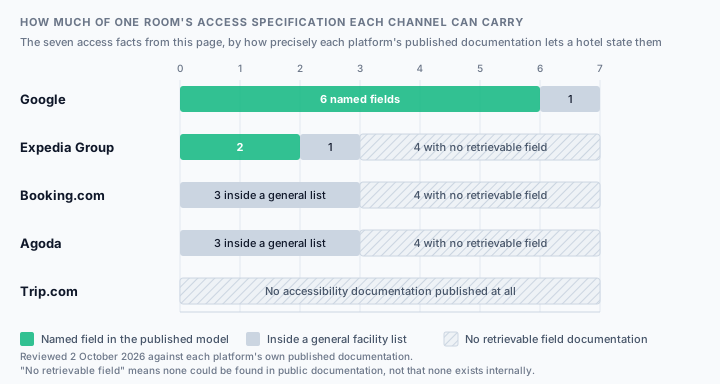
    The same seven facts, against the five channels, scored on one question: how precisely does this platform's own published documentation let a hotel state it? A named field means the model has a field for that fact specifically. A general list means it can only be expressed as one undifferentiated facility or amenity among all the others. No field means none could be found in public documentation on the review date — which is a statement about the documentation, not proof that nothing exists internally.

    A stacked bar for each listing channel, divided across the seven access facts. Google has a named field for six of the seven and folds the seventh into a general facility flag. Expedia Group has named fields for two, a general facility for one, and no retrievable field for four. Booking.com has no named accessibility field, three facts inside a general facility list, and no retrievable field for four. Agoda has the same shape as Booking.com. Trip.com publishes no accessibility documentation, so all seven facts have no retrievable field.
    Scroll horizontally on a narrow screen, or read the same mapping in the table and notes below. Counted from the seven facts above; the bars are a summary of the table, not a score for the platforms.
    Each access fact against each listing channel, showing whether the platform publishes a named field, a general facility list entry, or no retrievable field
    Access factBooking.comExpedia GroupAgodaTrip.comGoogle
    Step-free route to the entranceGeneral listGeneral listGeneral listNo fieldGeneral list
    Clear door width and turning spaceNo fieldNo fieldNo fieldNo fieldNamed field
    Roll-in shower, bath, toilet and grab barsNo fieldNo fieldNo fieldNo fieldNamed field
    Visual fire alarm, doorbell, captionsNo fieldNo fieldNo fieldNo fieldNamed field
    Marked accessible bay on siteGeneral listNamed fieldGeneral listNo fieldNamed field
    Accessible lift, pool hoist, shared areasGeneral listNo fieldGeneral listNo fieldNamed field
    Loan equipment and assistance animalsNo fieldNamed fieldNo fieldNo fieldNamed field

    The row worth stopping on is the fire alarm. US accessibility standards treat guest rooms with communication features as their own class, specified separately from rooms with mobility features and subject to their own dispersion rule. Exactly one of these five channels publishes a field in which a hotel could mention having them.

    What each cell actually means

    The badge is the summary; this is the evidence behind it, fact by fact.

    Step-free route to the entrance

    Why this fact matters: Can I get in without using a step?

    Booking.com
    An entry in the general facility list. Booking.com's own traveller article confirms a wheelchair-accessible filter exists, so a property-level flag is there; no entrance-specific field is documented.
    Expedia Group
    The reference lists name an accessibility amenity and an accessible-wheelchair amenity. No entrance or threshold identifier is published.
    Agoda
    A checkbox among the facilities under Property settings. The published help page names only Property services and Sports and recreation as the groups.
    Trip.com
    No retrievable partner documentation for accessibility content of any kind.
    Google
    Folded into one property-wide flag whose own description names auto-opening doors, wide lifts, wide bathrooms and ramps — four different facts behind a single boolean.

    Clear door width and turning space

    Why this fact matters: Will my chair fit through the door and turn once it is inside?

    Booking.com
    No retrievable field. Facilities carry only paid and off-site attributes, so there is nowhere for a dimension to live.
    Expedia Group
    Amenities exist at property, room and rate level, but no width or clearance identifier is published in the reference lists.
    Agoda
    Room-level amenities are a highlight-and-save list. No dimension field is documented.
    Trip.com
    Nothing published. No dimension or clearance field could be retrieved, and nor could any field that would hold one.
    Google
    Two unit-level flags exist — a mobility-accessible unit and an ADA-compliant unit — but the schema publishes no clear width and no turning circle either. The finest answer available anywhere is still a boolean.

    Roll-in shower, bath, toilet and grab bars

    Why this fact matters: Roll-in shower, transfer shower, or a bath I cannot use?

    Booking.com
    No retrievable bathroom-access field. The documented detail objects cover internet, parking, restaurant and swimming pool.
    Expedia Group
    No bathroom-access identifier is published in the reference lists.
    Agoda
    No bathroom-access amenity is named in the published facilities guidance.
    Trip.com
    Nothing published. Breakfast and child policies are on the onboarding list a new property is asked to prepare; a bathroom transfer type is not.
    Google
    The only model that separates them: distinct unit-level fields for an accessible shower, an accessible bathtub and an accessible toilet. Grab bars are named in none of the five models, including this one.

    Visual fire alarm, doorbell, captions

    Why this fact matters: Will I know if the fire alarm goes off while I am asleep?

    Booking.com
    No retrievable field for hearing access.
    Expedia Group
    No hearing-access identifier is published in the reference lists.
    Agoda
    No hearing-access amenity is named in the published facilities guidance.
    Trip.com
    Nothing published. Four of the five channels have no field for hearing access, and this is the one where there is no partner documentation to check at all.
    Google
    Three unit-level fields: a hearing-accessible unit, a hearing-accessible doorbell and a hearing-accessible fire alarm. US standards define this as a separate class of guest room; one of five models has somewhere to say so.

    Marked accessible bay on site

    Why this fact matters: Is there a marked accessible space, on site, that I can book?

    Booking.com
    Parking has its own detail object, but the documented sub-fields are price, public or private, location and whether reservation is needed — not access. The off-site attribute is the one genuinely useful distinction available.
    Expedia Group
    An accessible-parking amenity is named in the content reference lists, alongside the general accessibility amenity.
    Agoda
    A facilities checkbox under Property settings; no accessible-parking amenity is named in the published guidance.
    Trip.com
    Nothing published. Read your own live listing to see whether any parking statement renders, and ask support which field produced it.
    Google
    Defined with unusual precision: a marked, designated area of prescribed size in which only registered, labelled vehicles transporting a person with physical challenges may park.

    Accessible lift, pool hoist, shared areas

    Why this fact matters: Can I reach the restaurant, the pool and the lift car itself?

    Booking.com
    A lift is one of the documented facility examples, and the swimming pool detail object covers type, payment and age restrictions. Whether either can be used by a wheelchair user is not a documented attribute.
    Expedia Group
    No accessible-lift or pool-hoist identifier is published in the reference lists.
    Agoda
    Sports and recreation is one of the two named facility groups, so the pool and gym are declared there — their accessibility is not.
    Trip.com
    Nothing published. Whether a lift or a pool is declared at all on this channel has to be established from the live page rather than from documentation.
    Google
    An accessible lift defined by door width and call-button placement, and an accessible pool defined as one with a mechanical chair that can be lowered and raised. The only hoist field in the set.

    Loan equipment and assistance animals

    Why this fact matters: Can I borrow a chair, and will my assistance dog be treated as a pet?

    Booking.com
    No retrievable loan-equipment field. A facility can be marked as paid, so a charge would be expressible if the field existed.
    Expedia Group
    An accessible-wheelchair amenity is named in the reference lists, and amenities are complimentary unless a surcharge or restriction is specified — so a loan charge has somewhere to go.
    Agoda
    No loan-equipment amenity is named in the published facilities guidance.
    Trip.com
    Nothing published. Ask partner support in writing how an assistance animal is distinguished from a pet here, and record the reply with its date.
    Google
    A wheelchair-rental field, defined as wheelchairs the property lends to guests, free of charge or for a fee.

    Platform by platform

    One entry per channel, against the same three questions: where the hotel declares access, how much detail the model carries, and what the guest ends up able to read. Quotations are the platform's own words; gaps are marked as gaps.

    Booking.com

    Model published

    Booking.com

    Access is a facility, in the same flat list as a lift and an outdoor swimming pool, and the list itself is fetched from the platform rather than published as a document.

    Where it is declared
    The facilities the property ticks in its partner portal. The identifiers behind those ticks are not published as a static reference: Booking.com's developer documentation points integrators at a constants endpoint to retrieve the unique identifiers and names of the data types used with properties, which means the accessibility facility names cannot be read off a documentation page at all.
    How much detail the model carries
    A facility entry carries an identifier and two documented attributes — whether it requires payment and whether it is located off-site. The platform publishes richer detail objects for four subjects, and access is not one of them: internet, parking, restaurant and swimming pool each get a structured breakdown, while accessibility stays a flag.
    What the guest can read
    Booking.com's own traveller-facing article confirms a wheelchair-accessible filter on room search, and in the same article tells guests to contact the hotel because the meaning of the word varies between hotels. That is the platform describing the limits of its own field, in its own words, to the people relying on it.

    Documentation gap: Two gaps, in opposite directions. partner.booking.com refused an automated request on 2026-10-02, so no Extranet click path or facility name is claimed here — confirm the current wording in your own Extranet. And the demand-side documentation describes the data model behind the public listing rather than the screens a hotelier clicks, so the absence of a documented accessibility detail object is evidence about the published model, not proof that no internal field exists.

    How to audit a Booking.com hotel listing

    Expedia Group

    Model published

    Expedia, Hotels.com, and other Expedia Group brands

    Access is a handful of numeric amenity identifiers resolved through a downloadable reference list, sitting in the same alphabetical space as a bar and a casino.

    Where it is declared
    The amenities attached to the property, the room or the rate. Expedia Group's content documentation is explicit that property information is often represented as identifiers, and that amenities exist at three levels: available to all travellers, applicable only to the associated room, or applicable only to the associated rate plan. Declaring access at the wrong level is therefore a real failure mode rather than a theoretical one.
    How much detail the model carries
    The published reference list names a general accessibility amenity, an accessible-parking amenity and an accessible-wheelchair amenity. That is more than a single flag and far less than the standards ask for: there is no published identifier for a transfer type, a door width, a hearing-accessible room or an accessible route between facilities.
    What the guest can read
    A traveller filters on an amenity identifier. Because amenities are documented as complimentary unless a surcharge or restriction is specified, an accessible facility declared without a surcharge reads to the guest as included — which is the correct default for access and the wrong one for a charged loan item.

    Documentation gap: This is Expedia Group's demand-side content documentation, not Partner Central interface guidance: it establishes which identifiers exist and at what level, not the name of the field a hotelier edits. The amenity list itself is a downloadable file rather than a web page, so the three accessibility names above are what the reference page exposes — the file may contain more. One listing feeds Expedia, Hotels.com and the group's other brands, so an accessibility correction has to be re-checked on more than one public page.

    How to audit an Expedia hotel listing

    Agoda

    Model published

    Agoda

    Access is a tick in a facilities list, split across a property level and a room level, with a publication delay the operator has to plan around.

    Where it is declared
    Two different screens, and the distinction matters. Property-wide facilities are ticked under Property settings; anything room-specific is highlighted under room-level amenities on the individual room. A hotel with one adapted room that declares access at property level has told every guest the building is accessible; a hotel that declares it only at room level may not appear in a property-level filter at all.
    How much detail the model carries
    The published guidance names two facility groups — Property services, and Sports and recreation — and no accessibility group. Accessibility items therefore sit inside a general services list rather than in a structure of their own, and no transfer type, dimension or hearing-access item is named in the documentation.
    What the guest can read
    Whatever the facility list renders, after a delay the partner guidance states plainly: changes to property facilities can take up to six hours to appear on the website. An accessibility correction made for a guest arriving today is not necessarily visible to that guest.

    Documentation gap: The cited page is Agoda's general facilities procedure, not an accessibility-specific guide, and it does not enumerate the facilities available inside each group. The absence of a named accessibility group is evidence about the published guidance, not proof that no accessibility items exist in the live list — check the actual checkboxes in your own portal and record what you find.

    How to audit an Agoda hotel listing

    Trip.com

    No published model

    Trip.com

    No retrievable partner-facing accessibility documentation at all. Its public onboarding FAQ lists what a new property should prepare, and accessibility is not on the list.

    Where it is declared
    Not published. The onboarding FAQ asks a new partner to have the property address and name in English, the property type, contact details, photos, settlement details, and breakfast and child policies ready. Access is absent from that list, which is the only public statement available about what the platform asks a property to declare.
    How much detail the model carries
    Not published. No accessibility field, facility name or amenity identifier could be retrieved from public Trip.com partner material on the review date.
    What the guest can read
    Not established. Whether the public listing renders any accessibility statement, and from which field, could not be determined from documentation — only from reading a live listing.

    Documentation gap: Absence of retrievable documentation is not evidence that Trip.com models nothing. It means this channel cannot be audited from documentation at all: read your own live listing as a guest, ask partner support in writing which accessibility fields exist and where they are edited, and record the reply with its date. Until you have that reply, treat the channel as publishing no access information and say so to guests who ask.

    Google

    Model published

    Google hotel results

    The only model in the set that treats access as a structure rather than a flag: property-wide mobility fields, separate living-area fields, and the one hearing-access vocabulary available anywhere.

    Where it is declared
    The hotel's content feed, within Google's published lodging schema. Property-wide items — a mobility-accessible property, accessible parking, an accessible lift, an accessible pool, wheelchair rental — sit at one level; the room-specific items sit in a living-area accessibility section of their own, which is what makes it possible to say that the building is adapted and this particular room is not.
    How much detail the model carries
    The finest in the set, and still short of the standard. Thirteen named fields, including separate ones for an accessible shower, an accessible bathtub and an accessible toilet, and three for hearing access: a hearing-accessible unit, a hearing-accessible doorbell and a hearing-accessible fire alarm. What it does not carry is a single measurement — no clear width, no turning circle, no grab-bar field, no transfer-space statement.
    What the guest can read
    Whatever the hotel's feed populates. The definitions are unusually concrete — an accessible pool is one with a mechanical chair that can be lowered and raised, an accessible lift is one built to take a wheelchair user given its door width and call-button placement — so a populated field here carries more meaning than a tick elsewhere.

    Documentation gap: This is Google's lodging content schema. It shows how the data is structured, not that any hotel's feed populates every field, and not which interface a given property edits it in. A richer model also raises the cost of silence: a field that exists and is left empty is read as a no by anyone filtering on it.

    How to audit a Google hotel listing

    The standard a description is held to

    This is the part that reframes the whole field. Both of the standards below are about the description, not the building — and both ask for more detail than most of the fields above can carry. Summarised here to explain the bar, not as legal advice; see what this page is not.

    The ADA reservations rule

    United States

    In force; the reservations rule applies to reservations made by any means, including through a third party.

    What it requires
    A place of lodging must let disabled guests reserve accessible rooms in the same manner and during the same hours as everybody else, describe the accessible features in enough detail for the guest to decide independently, hold accessible rooms back until the last room of that type is gone, block a reserved accessible room out of every reservation system, and guarantee the specific room reserved.
    What it means for your listings
    The standard is not “is there an accessible box ticked”. It is whether a disabled traveller can assess the room independently, from the description, without calling. Measured against that, a single wheelchair-accessible flag is not a description — and the rule reaches reservations made through a third party, which is to say through your OTA listings.

    Identify and describe accessible features in the hotels and guest rooms offered through its reservations service in enough detail to reasonably permit individuals with disabilities to assess independently whether a given hotel or guest room meets his or her accessibility needs.

    The European Accessibility Act

    European Union

    Accessibility requirements apply to the covered services from June 2025.

    What it requires
    The Act sets common EU accessibility requirements for a defined list of products and services, and the European Commission's published list of what it covers includes e-commerce. Services in scope have to make information about the service and its accessibility features available in an accessible way.
    What it means for your listings
    Read the two halves separately, because they are often conflated. The Act is largely about whether the booking interface itself is usable — and Booking.com's own accessibility statement, published in June 2025, says it applies to the portions of its services covered by the Act, while directing questions about wheelchair access or walk-in baths at a specific stay to the provider of that stay. The platform takes the interface. The accuracy of the access facts stays with the hotel.

    If you have any questions or accessibility requests about your Travel Experience (e.g. wheelchair access, walk-in baths, etc.), please contact the service provider of the Travel Experience.

    Why one room reads five different ways

    Seven mechanisms, in rough order of how often they explain a difference. Almost none of them is a platform fault or an operator's carelessness — most are what happens when one specification is poured into containers of five different sizes.

    1. The models have different numbers of fields, so detail is lost on the way down

      A hotel with a roll-in shower, a visual fire alarm and one marked bay can state all three in Google's schema, two of them as Expedia amenity identifiers, and one of them as a Booking.com facility tick. Nothing is being hidden; the information is being poured into containers of different sizes. The channel with the fewest fields decides what your most access-dependent guest gets to read.

    2. One word is doing the work of seven facts

      “Accessible” is the only accessibility statement most channels can carry, and it is not a specification. Booking.com says so itself in its traveller article: the meaning varies from hotel to hotel. Two listings that both say accessible are not consistent in any useful sense, and two that disagree may be describing the same building honestly at different levels of detail.

    3. Property level and room level were confused

      Expedia Group documents amenities at property, room and rate level. Agoda splits facilities between Property settings and room-level amenities. Google separates property-wide mobility fields from a living-area accessibility section. Declare one adapted room at property level and the whole building reads as accessible; declare a building-wide ramp only at room level and it reaches one room type.

    4. An empty field is read as a no

      On a channel with many accessibility fields, silence is an answer. A hotel that has grab rails and never populated the field has effectively told every filtering guest it does not. The richer the model, the more a blank costs — which is the counter-intuitive reason the channel with the best structure can produce the worst outcome for an under-maintained listing.

    5. The edit has not published yet

      Agoda's partner guidance states that facility changes can take up to six hours to appear. Publication lag is ordinary for content fields and merely annoying for a breakfast price; for an arrival tomorrow it means the correction you made this morning is not what your guest is reading. Re-check the live page rather than the portal.

    6. Nobody owns the field

      Breakfast belongs to revenue, rates belong to revenue, photos belong to marketing — access usually belongs to whoever last had a complaint. It is entered once at onboarding, by someone describing a building they may not have measured, and then never revisited because no report flags it and no channel manager reconciles it.

    7. The assistance animal hit the pet policy

      An assistance animal is not a pet, but the only field most channels have for an animal is the pet field. Where pet policies already differ between channels — and they routinely do — the inconsistency lands on the guest who has the least room to absorb it, as a fee, a restriction, or a refusal.

    The accessible-room verification test

    You cannot audit this one field against another, because four of the five channels have no field to compare. The only workable method runs the other way: measure the room once, then check how much of that specification each channel is currently carrying. Six steps, in order.

    1. Measure the room once, on paper, before you touch a listing

      You cannot distribute a specification you do not have. For each room you sell as accessible, write down the narrowest clear door opening in centimetres, the turning space beside the bed, the bathroom transfer type in plain words, whether grab rails are fitted and where, the bed height, and whether the alarm is audible only. This sheet is the source of truth every channel gets a lossy copy of, and it is the only document that survives a platform redesign.

    2. Walk the chain, not the features

      Start at the pavement and go to the bed, writing down every threshold, step, ramp gradient, heavy door and narrow turn. Then do it again to the restaurant, the pool and the lift. A feature list passes; a chain fails at its worst link, and the worst link is what your guest experiences. Do this with the heaviest piece of equipment you claim to accommodate, not with a clipboard.

    3. Read each public listing as a disabled guest, with the filters on

      Open each channel you sell on in a private window, apply its accessibility filter, and record two things: whether your property appears at all, and what the page actually says about access once you reach it. Appearing in the filter and saying nothing useful on the page are both failures, and they have different fixes — one is a missing tick, the other is a missing description.

    4. Map every fact to the field that can hold it, and record what fell off

      Take the seven facts from this page and the crosswalk table, and for each channel write down which of them you were able to state, which went into a general facility tick, and which had nowhere to go. The last column is the important one: it is your written record of what guests on that channel cannot learn from you, and it tells you exactly which questions your staff must be able to answer by phone and email.

    5. Put the lost detail where the channel will carry it

      Anything the structured fields cannot hold has to go into the free text the channel does publish — the property description, the room description, the house rules — in specific numbers rather than adjectives. “Roll-in shower, 90 cm clear bathroom door, grab rails to left of toilet, visual fire alarm fitted” is a description a guest can assess independently. “Accessible room available” is not, on any channel, under either standard cited above.

    6. Re-read the live pages after publication, and date the record

      Allow for the lag — Agoda documents up to six hours for facility changes — then read the live pages again and keep the before-and-after. Accessibility content is edited once and relied on for years, so the dated record is what tells you which version a guest booked under, and it is the only thing that lets you answer a complaint with evidence rather than apology.

    Clear the fields a scan can check, then do this one by hand

    Accessibility is not in the comparison, and this page says so rather than implying it is. What a free check does read on your live Booking.com, Expedia, Hotels.com, Trip.com and Agoda pages is breakfast, parking, pets, Wi-Fi, arrival times, cancellation terms and fees — including the pet policy, which is where an assistance-animal problem shows up. Clearing those takes the routine conflicts off your desk so the manual access work above gets the attention it actually needs.

    Run a free consistency scan

    No login, public pages only. See a sample report or exactly which fields the comparison covers.

    Before you edit, route the change with the hotel OTA extranet directory. Because access is declared at property level on one screen and room level on another, reconcile it with hotel room type mapping across OTAs first, and work through the rest of the facility list using the hotel amenity checklist. The assistance-animal problem belongs with hotel pet policies across OTAs, and photographs of an adapted bathroom are worth as much as the field you could not fill — hotel photos across OTAs covers getting them onto every channel. Confirm the edit actually rendered with how to verify hotel listing updates, and if you expected your channel manager to have handled all this, what a channel manager actually syncs explains why content fields behave differently from rates.

    Differences that are not mismatches

    On every other field, half the job is deciding what to ignore. Here the default runs the other way: two words that sound similar usually are not, because the words carry different promises to somebody who cannot absorb the difference. These are the cases that come up most, sorted.

    Observed differences between channels, whether they are equivalent or a real conflict, and why
    What you observeVerdictWhy
    “Lift” on one channel and “Elevator” on anotherSame thingTwo regional words for one machine, and the commonest false positive in a manual access audit. Normalise the vocabulary before comparing, or you will spend an afternoon on a finding that was only a dialect.
    “Accessible room” on one channel and “Wheelchair accessible” on anotherReal conflictNot the same promise. Accessible is an umbrella that can cover hearing, visual and mobility access; wheelchair accessible is a specific claim about moving through and turning inside the room. Booking.com's own traveller article warns that the meaning of accessible varies from hotel to hotel, which is the platform telling you its own field is not a specification.
    “Roll-in shower” on one channel and “Accessible bathroom” on anotherReal conflictThe second contains the first and also contains a bath with a rail. Google's schema is the only model reviewed here that separates an accessible shower from an accessible bathtub, so on four of five channels this difference cannot even be expressed — which makes the free-text description the only place the distinction can live.
    A property flagged as wheelchair accessible, with no room flagged as accessibleReal conflictA real conflict of scope rather than of wording, and the most consequential one on this list. Google separates property-wide mobility fields from a living-area accessibility section, and Expedia Group documents amenities at property, room and rate level. A ramp at the door and a bathroom nobody can use is a true property-level claim and a failed stay.
    “Accessible parking” on one channel and “Disabled parking space” on anotherSame thingSame fact, different era of language. Compare the underlying boolean and move on — but compare it against the next row, because the words are equivalent and the locations may not be.
    Accessible parking on site on one channel, and in a public car park nearby on anotherReal conflictThe same tick covering two different journeys. Booking.com's facility model can mark a facility as off-site, so the distinction is expressible there, and Google's accessible-parking definition is about a marked designated area rather than a nearby one. Two hundred metres and a kerb is not a detail for the guest who cannot cross it.
    Detailed accessibility information on one channel and none at all on anotherReal conflictThe most common pattern and the easiest to dismiss. Silence is not a negative, but a guest filtering on access reads it as one, and a guest who only ever sees that channel learns nothing about a room you have adapted. Treat a channel with no accessibility content as an outstanding task rather than a consistent one.
    “Service animals welcome” on one channel and “No pets allowed” on anotherReal conflictThese are different fields colliding, not a contradiction a guest can resolve. An assistance animal is not a pet, but the pet field is the only animal field most channels have — so a correct pet policy reads as a refusal. Say both things explicitly on every channel, in the pet policy itself.

    This is also why accessibility is not in the automated comparison. Normalising “lift” and “elevator” is safe; deciding that “accessible bathroom” and “roll-in shower” mean the same thing would be a guess, and the cost of that guess lands on the guest rather than on the invoice.

    One room, five different models

    Illustrative example, not measured data

    Take one real-shaped room specification: a ground-floor twin reached by a step-free route from the pavement, a 90 cm clear bathroom door, a roll-in shower with grab rails to the left of the toilet, a visual fire alarm and a vibrating pillow alarm, one marked accessible bay on site, and a wheelchair the hotel lends on request. Seven facts, all true, all verifiable with a tape measure. Below is how much of it each channel's documented model lets you say — derived from the sources on this page.

    Booking.com

    That the property has an accessibility facility, plus parking and a lift as separate facilities, each able to carry a paid or off-site attribute. The documented detail objects cover internet, parking, restaurant and swimming pool, so none of the room-level facts has a structured home.

    Falls off: The shower type, the door width, the grab rails, the visual alarm and the loan wheelchair. All five have to go into free-text description, and the facility names themselves are only visible in your own Extranet.

    Expedia Group

    A general accessibility amenity, an accessible-parking amenity and an accessible-wheelchair amenity — and, usefully, at room level rather than only property level, so the adapted twin can be distinguished from the rest of the building.

    Falls off: The shower type, the door width, the grab rails and both alarms. Remember the amenity default too: declared without a surcharge, the loan wheelchair reads as complimentary, which may be what you intend or may not.

    Agoda

    A facilities tick under Property settings for anything property-wide, and a room-level amenity highlight for anything specific to the adapted twin. Nothing in the published guidance names an accessibility group, so the items sit inside the general services list.

    Falls off: The shower type, the width, the rails, both alarms and the loan chair — and for up to six hours after you save it, everything you changed, because that is the documented publication delay.

    Trip.com

    Nothing can be derived from documentation, because none is published. Accessibility is not among the information the onboarding FAQ asks a new property to prepare.

    Falls off: Potentially all seven facts. Establish what this channel can actually carry by reading your own live listing and asking partner support in writing, then record the answer with its date.

    Google

    Six of the seven, as named fields: a mobility-accessible property, accessible parking, wheelchair rental, a mobility-accessible unit, an accessible shower and an accessible toilet, plus a hearing-accessible unit and a hearing-accessible fire alarm for the alarms — the only place in this table where the alarms have a field at all.

    Falls off: The 90 cm door width and the grab rails. The best-structured model in the set still has no measurement and no grab-bar field, which is the clearest evidence that free text is not a workaround but a permanent part of the job.

    Read the bottom row twice. The best-structured model in the set, fed a perfectly documented room, still cannot carry the 90 cm door or the grab rails. That is the finding this page exists for: free text is not a workaround for a badly configured listing, it is a permanent part of describing access on every channel that exists today.

    What this page is not

    • This is not legal advice, and it is not a compliance opinion. The ADA reservations rule and the European Accessibility Act are summarised here only to explain the standard a listing description is measured against. Your obligations depend on where you operate, how large you are and what you sell, and they are a question for a qualified adviser.
    • It is not an accessibility audit or a certification. A tape measure and this page tell you what to publish; they do not tell you whether a room meets a building standard. Only a qualified access audit does that, and nothing here substitutes for one.
    • It is not a ranking of which OTA is most accessible. The crosswalk compares what each platform's published documentation lets a hotel declare — which is a statement about documentation, not about how well any platform serves disabled travellers.
    • It is not a click-path guide. Interface names change without notice, one platform refused automated retrieval on the review date, and another publishes nothing. Where a path is not stated here, it is because it could not be verified.
    • It is not a list of every channel. It covers the five listings the scanner reads — Booking.com, Expedia, Hotels.com, Trip.com and Agoda — plus Google, grouped into the five published models behind them, because those are the surfaces this repository can evidence.
    • It does not claim MisMatchMaker checks any of this. The scanner compares no accessibility field today, and the scope note below says so plainly rather than implying coverage the comparison does not have.

    Scanner scope: A MisMatchMaker scan does not compare accessibility fields. The comparison covers breakfast, pets, parking, Wi-Fi, arrival times, cancellation terms, fees and a short list of general amenities, and accessibility is not among them — partly because most channels do not publish the fields in a form two listings can be compared on, and partly because a false negative here would be worse than no answer. Parking availability and type are compared, which is adjacent but not the same fact: a scan can tell you the two listings disagree about parking, not that one of them promises an accessible bay. Treat the verification test on this page as a manual check that sits beside an automated content scan, not inside it.

    Frequently asked questions

    Is there a standard definition of an accessible hotel room across OTAs?
    No. There is no shared definition and no shared field set. Google's lodging schema carries about a dozen named accessibility fields, including separate ones for an accessible shower, an accessible bathtub and an accessible toilet; Expedia Group's content reference lists name a general accessibility amenity plus accessible parking and an accessible wheelchair; Booking.com models access as an entry in a general facility list whose only documented attributes are whether it is paid and whether it is off-site; Agoda's published facilities guidance names no accessibility group at all; and Trip.com publishes nothing retrievable. Booking.com's own traveller article puts it most plainly: the meaning of accessible can vary from hotel to hotel.
    What accessibility fields does Google's hotel data model include?
    More than any other model reviewed here. At property level it names a mobility-accessible property, accessible parking, an accessible lift, an accessible pool and wheelchair rental, with notably concrete definitions — accessible parking is a marked, designated area of prescribed size for registered, labelled vehicles, and an accessible pool is one with a mechanical chair that can be lowered and raised. A separate living-area accessibility section covers the room itself: a mobility-accessible unit, an ADA-compliant unit, a hearing-accessible unit, a hearing-accessible doorbell, a hearing-accessible fire alarm, and distinct fields for an accessible shower, bathtub and toilet. What it still does not carry is a single measurement: no clear door width, no turning circle and no grab-bar field.
    Do OTAs have to describe accessible hotel rooms accurately?
    The obligation mostly runs to the hotel, and the standard is higher than a tick box. The US ADA reservations rule requires a place of lodging to identify and describe accessible features in enough detail to reasonably permit a disabled traveller to assess independently whether the room meets their needs, and it applies to reservations made by any means, including through a third party. In the EU, the European Accessibility Act brought e-commerce into scope from June 2025, and Booking.com's own accessibility statement — published in June 2025 — says it covers the portions of its services in scope while directing questions about wheelchair access or walk-in baths at a particular stay to the provider of that stay. The platform answers for the interface; the hotel answers for the facts. This is a summary of the standards, not legal advice.
    Why does my hotel show as wheelchair accessible on one OTA and not another?
    Usually because the channels have different numbers of fields and the information was poured into containers of different sizes. The same roll-in shower is a named field on one model, a general amenity identifier on another, an undifferentiated facility tick on a third and unpublishable on a fourth. On top of that, the level matters: declaring access at property level when only one room is adapted tells every guest the building is accessible, and declaring it only at room level can keep you out of a property-level filter entirely. Publication lag is the third cause — Agoda's guidance states facility changes can take up to six hours to appear — so a correction made this morning is not necessarily what today's guest reads.
    How do I list a wheelchair accessible room on Booking.com?
    Access is one of the facilities you tick for the property, and the public listing then exposes it to the wheelchair-accessible filter Booking.com describes in its own traveller article. Two honest caveats. First, the facility identifiers are not published as a reference document — Booking.com's developer documentation points integrators at a constants endpoint to retrieve the names and identifiers in use — so the authoritative list of what you can tick is the one in your own Extranet, and partner.booking.com refused automated retrieval on the review date, so no click path is claimed here. Second, the tick is not a description: the documented facility model carries only whether a facility is paid and whether it is off-site, so the shower type, the door width and the alarms have to go into your free-text room and property descriptions.
    Can a channel manager sync accessibility information across OTAs?
    Not faithfully, and the reason is structural rather than a shortcoming of any particular tool. Channel managers are built to distribute rates and availability; descriptive content is handled unevenly, and in this case there is no shared model to map onto. A field that exists on one channel has no counterpart on another, so a sync has to either drop the detail or invent a destination for it. There is no lossless translation between thirteen named fields and a single facility tick, which is why the practical answer is a written specification you own, pushed manually into whatever each channel can carry, plus free text for the rest.
    Does MisMatchMaker check accessibility information across OTAs?
    No, and it would be wrong to imply otherwise. A scan compares breakfast, pets, parking, Wi-Fi, arrival and departure times, cancellation terms, fees and a short list of general amenities across your public Booking.com, Expedia, Hotels.com, Trip.com and Agoda pages, quoting the source text for each. Accessibility is not among those fields, partly because most channels do not publish them in a form two listings can be compared on, and partly because a wrong answer here is worse than no answer. Two adjacent fields are compared and worth watching: parking, where a disagreement is worth reading closely even though a scan cannot tell you whether either listing promises an accessible bay, and the pet policy, where an assistance-animal problem will surface.
    What should I write in the free-text description about access?
    Numbers and nouns, not adjectives. The standard to aim at is the one the ADA reservations rule sets: enough detail for a guest to assess the room independently, without calling you. In practice that means the narrowest clear door opening in centimetres, the bathroom transfer type in plain words, where the grab rails are fitted, the bed height, whether the fire alarm is audible only, and what the route from the pavement to the room actually involves — including the bad news, because a guest who finds a step you did not mention will not book with you again, and one who reads about it and books anyway has made an informed choice.
    Sources

    Platform documentation and the primary texts of the two standards, each page opened and checked on the date shown. Help centres and developer references change wording without notice, so the linked page is always the authority — and where a platform refused automated retrieval or publishes nothing, that is recorded on its own entry rather than worked around.

    1. 28 CFR 36.302(e): Hotel reservations — US Department of Justice, ADA Title III regulations (Cornell LII), accessed
    2. 2010 ADA Standards, 224.5 Dispersion — US Access Board / DOJ 2010 ADA Standards (Corada reproduction), accessed
    3. The EU becomes more accessible for all — European Commission, accessed
    4. European accessibility act: covered products and services — European Commission, accessed
    5. Accessibility statement — Booking.com, accessed
    6. Retrieve accommodation details — Booking.com Developers (Demand API), accessed
    7. About accommodations — Booking.com Developers (Demand API), accessed
    8. What are accessible hotel rooms? — Booking.com, accessed
    9. Content reference lists — Expedia Group Developer Hub, accessed
    10. Content API search and response filtering — Expedia Group Developer Hub, accessed
    11. How do I add or remove property facilities and amenities? — Agoda Partner Hub, accessed
    12. List your property: partner FAQs — Trip.com, accessed
    13. Lodging Format Schema — Google Hotel Center (developer reference), accessed

    Related references on this site: hotel child policies across OTAs is the other field where each platform models a different number of dimensions, and hotel star ratings across OTAs covers the listing number a hotel does not own. The OTA content audit checklist puts this check in sequence with the rest of the field sweep. The wording standard behind all of them is in the methodology: claims narrowed to what the source supports, gaps left visible, and nothing inferred presented as documented.