Reference

    Hotel child policies across OTAs: age bands, free stays and extra beds

    “Under six stay free” is one sentence at the front desk and five separate settings in your distribution. Each channel models a child in a different number of dimensions — one starts from its own age default, another asks the property to define childhood, a third attaches a switch that decides whether a free child takes a place in the room, and one publishes nothing at all. This page records what each platform's own documentation says, and gives you a repeatable test for what your guests are actually being shown.

    Every age, rule and quotation below was checked against primary sources on . Where a platform publishes nothing retrievable, the entry says so instead of guessing.

    The short answer

    There is no shared definition of a child. Booking.com documents a default of ages 0–17, which a property can narrow with its own minimum age, and its child rates apply only to children in existing beds — never to cots or extra beds. Expedia Group says children are typically 17 or younger but that each hotel configures its own range, and it requires each child's age at booking. Agoda is the most explicit: an infant band set anywhere inside 0–5, a child band set anywhere inside 1–21, and an occupancy-control switch that decides whether free children sit inside the room's limit or on top of it. Trip.com publishes no child policy documentation at all. Google has no priced child band — only a maximum age attached to a free-stay policy. Four individually correct configurations can therefore produce four different bills for the same family.

    What most operators get wrong

    • Treating “child policy” as one setting. It is five: the minimum guest age, the band edges, the occupancy count, the bedding, and the price basis. Four of them can be right while the guest is still quoted the wrong total.
    • Reading “free” as one word. On one channel a free child is not charged; on another it is also not counted against occupancy. Encode the same intent both ways and you will sell a room to more people than it sleeps.
    • Assuming a free-child band covers a cot. Booking.com's documented child rates apply to existing beds only, and whether a cot is free, charged or unavailable is a separate decision you have to make.
    • Auditing the number and not the basis. Twenty per night and twenty per stay look identical in a spreadsheet and diverge on every stay longer than one night.
    • Trying to audit this from the listing page. Three of the five facts only appear once a specific family composition is priced, which is why the test further down this page uses a fixed composition and fixed dates.
    • Expecting a channel manager to reconcile it. The platforms do not share a child-policy model, so there is often no faithful translation to push between them.

    A child policy is five facts, not one

    Separate these before you compare anything. They have different owners, live in different screens, become visible to a guest at different moments, and fail in different ways. The last column is honest about which of them an automated content scan can see at all.

    The minimum guest age

    Partly compared

    How old does somebody have to be to stay here at all?

    What it decides
    Whether the property accepts under-18s, unaccompanied minors, or has an adults-only rule. This is a house rule rather than a price, and it decides eligibility before any rate is calculated. Booking.com's model lets a property define its own minimum age on top of the platform default, and Expedia Group states plainly that some properties do not allow guests under 18.
    How it fails
    An adults-only rule on one channel and a family rate on another. The guest books the channel that sold them the room and arrives with a child the house rules do not admit, which is the one child-policy error that cannot be settled with money at the desk.
    Where a guest sees it
    Readable on the listing page

    Where childhood starts and ends

    Manual check

    At what age does a guest stop being an infant, a child, an adult?

    What it decides
    Which rate a guest is quoted. An infant band, one or more child bands, and the adult threshold above them are separate numbers, and each platform lets a property set them within its own limits. The same nine-year-old can sit in a free band, a discounted band, or be priced as an adult depending on where the boundaries fall.
    How it fails
    Boundaries that were entered once per platform and never reconciled. A one-year difference in a band edge is invisible on the listing page and produces two different bills for the same booking request, which is exactly the dispute the front desk cannot win.
    Where a guest sees it
    Only in a priced family search

    Whether a child counts against occupancy

    Manual check

    Does a free child take a place in the room, or sit on top of it?

    What it decides
    How many people the channel will sell into the room. Agoda documents this as an explicit switch: with occupancy control on, the free children are counted inside the room's limit; with it off, they are added on top of it. Booking.com's model constrains it differently, tying child numbers to the requirement that an adult is always present.
    How it fails
    A room that is sold to more bodies than it can sleep. Nothing on the listing looks wrong, the rate loads, and the mismatch is discovered by a family standing in the doorway of a room with one fewer bed than people.
    Where a guest sees it
    Only in a priced family search

    What the child actually sleeps in

    Compared by a scan

    Existing bedding, a cot, or an extra bed — and do you have one?

    What it decides
    Whether the policy can be honoured at all. Booking.com's documented child rates apply only to children in existing beds, not to cots or extra beds, and it is the property that decides whether cots and extra beds are offered free, charged for, or not provided. Agoda sets a separate per-room allowance for extra beds and baby cots.
    How it fails
    A free-child promise that silently assumes a bed the room does not have, or a cot inventory smaller than the number of cots sold on a busy night. The policy is not wrong; it is unfulfillable.
    Where a guest sees it
    Readable on the listing page

    How the charge is expressed

    Partly compared

    Per child, per night, or as a share of the adult rate?

    What it decides
    What the guest pays. Booking.com's model documents percentage-of-adult-rate, per-child and per-age-band pricing as distinct types, and Agoda lets a child rate be set as a percentage of the adult price. The same intended discount encoded in two different bases is two different prices.
    How it fails
    A number that matches across channels while the basis does not. Twenty per night and twenty per stay look identical in an audit that only reads the figure, and diverge on every multi-night family booking.
    Where a guest sees it
    Only in a priced family search

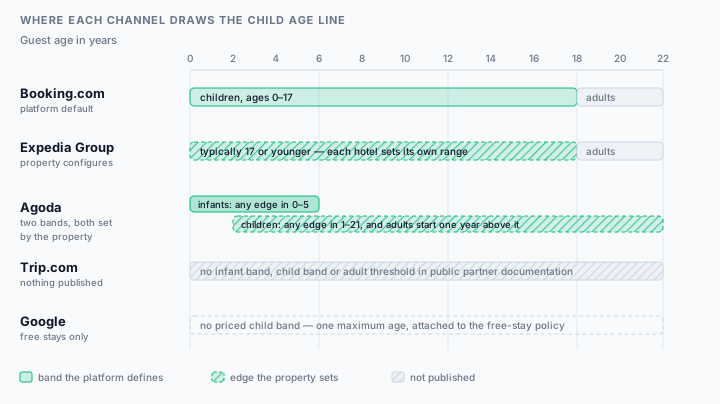
    Where each channel draws the child age line

    Read the diagram as one row per channel and ask a single question: who chose that edge? Where the answer is the platform, your job is to know the default. Where it is you, your job is to make the same choice twice.

    An age axis from 0 to 22 with one row per listing channel. Booking.com treats ages 0 to 17 as children by default, with adults from 18 and a property-set minimum age allowed on top. Expedia Group says children are typically 17 or younger but each hotel configures its own range. Agoda has two property-set bands: infants anywhere inside 0 to 5 and children anywhere inside 1 to 21, with adults one year above the child edge. Trip.com publishes no bands. Google has no priced child band, only a maximum age attached to its free-stay policy.
    Scroll horizontally on a narrow screen, or read the same mapping in the table below. Agoda's two bars are the permitted ranges for the edges, not the bands themselves — the property picks a value inside each.
    Each listing channel with its documented infant band, child band, adult threshold, and who sets the boundary
    ChannelInfantsChildrenAdults fromBoundary set by
    Booking.comBooking.comNo separate infant band in the documented model; cots are handled as bedding, not as an age classAges 0–17 by default18, unless the property sets a higher minimum agePlatform default, which the property can narrow with its own minimum age
    Expedia GroupExpedia, Hotels.com and other Expedia Group brandsNo separate infant band is published; cot charges are returned with the rate rather than as an age classTypically 17 or younger, but each hotel configures its own rangeWherever the hotel's configured child range ends; some properties admit nobody under 18 at allThe property, within Expedia Group's guidance
    AgodaAgodaAn explicit infant band, set anywhere between 0 and 5 years oldAn explicit child band, set anywhere between 1 and 21 years oldOne year above the child band's upper edge — anything from 2 to 22The property, at property level first and then applied to room types
    Trip.comTrip.comNot publishedNot publishedNot publishedNo retrievable partner documentation; its onboarding FAQ lists child policies only as information to prepare
    GoogleGoogle hotel resultsNo infant band; cots and rollaway beds are modelled as sleeping arrangementsNo priced child band. A single maximum child age is attached to the free-stay policy onlyNot modelled as a price boundaryThe hotel's content feed, within Google's lodging schema

    The consequence worth sitting with: the age at which a guest becomes an adult is a platform default on one channel and anywhere between 2 and 22 on another. Nothing reconciles the two for you.

    Platform by platform

    One entry per channel, against the same four questions: the age rule, the occupancy rule, the bedding rule and the price basis. Quotations are the platform's own words; gaps are marked as gaps.

    Booking.com

    Model published

    Booking.com

    Children are an age range with their own rate structure, bolted onto an occupancy rule that always requires an adult in the room.

    Age rule
    The documented default treats ages 0–17 as children, and a property can define its own minimum age on top of that. The age range is the input to the child rate, so moving the boundary moves the price.
    Occupancy rule
    The number of children is capped by the requirement that at least one adult is always present: it cannot exceed the total number of guests minus one. Where the maximum-occupancy children value is null there are no child rates at all and children are shown priced as adults.
    Bedding rule
    Child rates apply only to children in existing beds. Cots and extra beds sit outside them, and the property decides whether to offer cots and extra beds free, charge a fee, or not provide them at all.
    Price basis
    Three distinct pricing types are documented — a percentage of the adult rate, a price per child, and prices per age band — and a free band is expressed as a free-stay signal while the returned prices already reflect it.

    Documentation gap: This is Booking.com's demand-side documentation: it describes the data model behind the public listing, not the Extranet screens a hotelier clicks. partner.booking.com refused an automated request on 2026-09-30, so no Extranet click path is claimed here — confirm the current field names in your own Extranet.

    How to audit a Booking.com hotel listing

    Expedia Group

    Model published

    Expedia, Hotels.com, and other Expedia Group brands

    The child's exact age is a required input at booking time, and the property defines what age even counts as a child.

    Age rule
    Expedia Group publishes a typical boundary of 17 or younger while stating that each hotel configures the range it classifies as a child, and that some properties do not allow guests under 18 at all. The boundary is therefore a property setting with a platform norm around it, not a fixed platform rule.
    Occupancy rule
    Because each child's age is supplied at booking, the response can carry age restrictions as well as extra-occupancy or cot charges, and those can change both the price and whether the booking is allowed at all.
    Bedding rule
    Cot charges are returned alongside the rate rather than as a separate age class, so a cot is priced at the point of sale and not declared as a standing child band.
    Price basis
    There is no single published child-rate shape on the demand side: the price that comes back already accounts for the ages supplied, which is why two channels can quote the same family differently without either being misconfigured.

    Documentation gap: These are launch requirements for Expedia Group's lodging API partners, not Partner Central interface guidance. They establish what the platform requires and returns, not the name of the field you edit. One listing feeds Expedia, Hotels.com and the group's other brands, so a child-policy change has to be re-checked on more than one public page.

    How to audit an Expedia hotel listing

    Agoda

    Model published

    Agoda

    The most explicit model of the five: separate infant and child bands defined at property level, then applied to room types, with a switch that decides whether free children sit inside or on top of occupancy.

    Age rule
    Infants are allowed within a band set between 0 and 5 years old, children within a band set between 1 and 21, and guests older than the maximum child age are counted as adults. The bands are defined at property level first and then applied to room types, so a property-level edit reaches every room and a room-level override does not travel back.
    Occupancy rule
    Occupancy control is a documented switch with two different arithmetics. On, the adults, children and infants a room takes — including the children allowed free — are limited to the guests allowed in the room plus the extra beds. Off, maximum occupancy becomes the guests allowed plus the extra beds plus the children allowed free. The same room sells to a different number of people depending on which way it is set.
    Bedding rule
    Base occupancy is defined as the maximum number of guests of any age who can stay in the room without requiring an extra bed, and a separate per-room allowance caps how many extra beds and baby cots the room accepts.
    Price basis
    Child rates can be set per age group, and a percentage-of-adult-price type derives the adult price from the room rate divided by the number of adults searched. Extra bed prices are set in property settings and pre-populate the extra bed field on the calendar.

    How to audit an Agoda hotel listing

    Trip.com

    No published model

    Trip.com

    No retrievable partner-facing child policy documentation at all. Its public onboarding FAQ lists child policies among the information a new property should have ready, and says nothing about how the platform models them.

    Age rule
    Not published. No infant band, child band or adult threshold could be retrieved from public Trip.com partner material on the review date.
    Occupancy rule
    Not published. Whether a free child counts inside or on top of a room's occupancy could not be established from a public source.
    Bedding rule
    Not published. No cot or extra-bed allowance model could be retrieved.
    Price basis
    Not published. Because nothing is documented, the only reliable evidence is what a priced family search on the live listing actually returns.

    Documentation gap: Absence of retrievable documentation is not evidence that Trip.com has no internal model. It means you cannot audit this channel from documentation: price a defined family composition on the live listing, ask partner support in writing for the age bands and the occupancy rule, and record the reply with its date.

    Google

    Model published

    Google hotel results

    Not one policy but three objects. The free-child allowance is a policy, the cots and rollaway beds are sleeping arrangements, and the child occupancy limit belongs to the guest unit — and a separate family-friendly flag is a feature, not a price.

    Age rule
    There is no priced child band. The only child age in the model is a maximum age attached to the free-stay policy: the hotel allows children up to a certain age to stay in the room of a parent or adult without an additional fee.
    Occupancy rule
    Child occupancy is a guest-unit field, expressed as a maximum number of child occupants, and it sits apart from the free-stay policy that says whether those children are charged.
    Bedding rule
    Cots and rollaway beds are modelled as sleeping arrangements with their own availability flags and counts, so the bed inventory is declared independently of any child pricing.
    Price basis
    Nothing in the model expresses a child rate. It expresses whether children stay free, how many may do so, and up to what age — which is why a hotel can be flagged as having features for families with children while charging for every child in the room.

    Documentation gap: This is Google's lodging content schema. It shows how the data is structured, not that every hotel's feed populates every field, and not which interface a given property edits it in.

    How to audit a Google hotel listing

    Why one family gets four different answers

    Seven mechanisms, in rough order of how often they explain a difference. Most of them are configuration drift rather than a platform fault, which is why diagnosis comes before the support ticket.

    1. The band edges were entered platform by platform

      The bands are set in different places, in different orders, by different people, often months apart. Booking.com starts from a 0–17 default you may never have touched; Agoda asks you to choose both an infant band and a child band inside its own permitted ranges; Expedia Group expects you to define the range yourself. Nothing reconciles them, so the boundaries drift by a year or two and nobody notices until a bill is disputed.

    2. Free means two different things: not charged, and not counted

      A free child is a pricing statement on one platform and an occupancy statement on another. Agoda documents an occupancy-control switch where free children either sit inside the room limit or are added on top of it. Get the same intent encoded both ways across two channels and one of them will sell a room to more people than it sleeps.

    3. Existing bedding and extra bedding are different commitments

      Booking.com's child rates apply only to children in existing beds; cots and extra beds are a separate decision. An operator who reads 'children under six stay free' as covering a cot has promised something the rate does not contain, and the desk absorbs the difference.

    4. A matching number with a mismatched basis

      A child charge can be a percentage of the adult rate, a price per child, or a price per age band — and an extra bed can be per night or per stay. Two channels showing the same figure on different bases are not consistent, and the divergence grows with the length of stay.

    5. Property-level settings that room-level overrides hide

      Agoda's documented order is property level first, then applied to room types. A room-level override survives a property-level edit, so a policy that looks corrected at the top can still be wrong on the one room type families actually book.

    6. A missing band silently prices a child as an adult

      Where Booking.com's model has no children value in maximum occupancy, there are no child rates and children are priced as adults. Nothing shows as an error. The listing simply stops offering the family rate you believe you publish, and the cheaper competitor wins the search.

    7. Eligibility and price are decided in different places

      Expedia Group returns age restrictions in the same response as the price, so a family search can fail on eligibility rather than on cost. A minimum-age rule that is right on one channel and absent on another produces an arrival the house rules do not admit, which no refund fixes cleanly.

    The family search test

    You cannot audit a child policy from a listing page, because three of the five facts are not on it. They appear when a specific family is priced. Six steps that turn that into a repeatable check rather than a one-off investigation.

    1. Fix one family composition and one date range

      Pick a composition that crosses at least two of your band edges and a mid-week date at least 30 days out, outside any promotion. Two adults with a three-year-old and a nine-year-old exercises an infant band, a child band and the adult threshold at once. Use the same composition and the same dates on every channel, or you are comparing two different questions.

    2. Price it on every channel you sell on, in one sitting

      Search each public listing as a guest would, with children entered as children rather than as extra adults. Do it in one sitting: rates, availability and promotions move, and a comparison spread over two days will show differences that are only timing. Use a private window so a cached search does not answer for you.

    3. Record five values per channel, not one

      For each channel write down whether the search was accepted at all, the room's stated occupancy, what each child was charged, what the child sleeps in, and the basis of the charge. One 'child price' column is what lets a basis mismatch hide.

    4. Separate a real conflict from a modelling difference

      Before raising a ticket, decide which kind of difference you have. Different words for the same rule are not a conflict. A different band edge, a different occupancy count for the same room type, or a different basis is. The table below sorts the common cases.

    5. Fix at property level, then re-check the room type families book

      Edit in the portal that owns the channel, starting with the property-level bands where the platform has them, then confirm the room type your family search used. Where a platform documents room-level overrides, the override is what the guest sees.

    6. Re-run the identical search and keep the record

      Repeat step two with the same composition and dates after the change has had time to publish, and keep the before-and-after rows. A child policy is edited once a year and disputed all year, so the register is the only thing that tells you which version a guest booked under.

    Check the two facts a listing page does show

    Whether children are welcome at all, and the extra bed or cot fee, are published on your listings — along with breakfast, parking, pets, arrival times, cancellation terms and fees. A free check reads your live Booking.com, Expedia, Hotels.com, Trip.com and Agoda pages and shows where they disagree, quoting the source text for each field. Then run the family search test for the three facts it cannot see.

    Run a free consistency scan

    No login, public pages only. See a sample report or which fields the comparison covers.

    Before you edit, route the change with the hotel OTA extranet directory. Occupancy and bedding belong to the room record, so reconcile it with hotel room type mapping across OTAs first. Because the fee sits beside your other charges, check it against hotel taxes and fees across OTAs, and confirm the edit actually rendered using how to verify hotel listing updates. If you expected your channel manager to have handled this, what a channel manager actually syncs explains why content and policy fields behave differently from rates.

    Differences that are not mismatches

    Half of a manual child-policy audit is deciding what to ignore. Two phrasings of one rule are not a conflict; a band edge one year apart is. These are the cases that come up most, sorted.

    Observed differences between channels, whether they are equivalent or a real conflict, and why
    What you observeVerdictWhy
    “Children of all ages are welcome” on one channel, “Children welcome” on anotherSame thingTwo phrasings of the same permission. Normalise the wording and compare the underlying boolean, or you will generate findings that waste an operator's afternoon.
    A cot shown as free on one channel and as a priced item on anotherReal conflictA real conflict in what the guest is committed to pay. Booking.com's model makes cot provision an explicit property choice — free, charged, or not offered — so one of the two channels is carrying an old decision.
    Child band 0–5 on one channel and 0–6 on anotherReal conflictThe most expensive mismatch on this page and the least visible. It is invisible on the listing page, surfaces only in a priced search, and produces two defensible bills for the same six-year-old.
    An extra bed at 20 per night on one channel and 20 per stay on anotherReal conflictSame number, different basis, different bill on every stay longer than one night. Compare amount, currency and basis as three separate values.
    A child rate as a percentage of the adult rate on one channel and a fixed amount on anotherSame thingNot a conflict in itself: platforms document different pricing types, and the same intent has to be encoded differently. It becomes a conflict only when the resulting price for the same family differs — which is what the family search test measures.
    “Children stay free on existing bedding” against “Children stay free”Real conflictThe unqualified version promises more than the policy contains. Booking.com's child rates apply only to existing beds, so a free-child line without the bedding condition will be read as covering a cot or extra bed.
    Different maximum occupancy for two genuinely different room typesSame thingNot a mismatch at all, and the commonest false positive in a manual audit. Compare like room types by their internal identifier before comparing occupancy, or map them first.
    “Adults only” on one channel and a family rate on anotherReal conflictThe highest-severity case on the list, because it is an eligibility conflict rather than a price one. Expedia Group states that some properties do not allow guests under 18, and a guest who booked the other channel arrives with a child you cannot accommodate.

    This is the same distinction a scan has to make before it reports anything: normalise wording, currency and basis first, keep the original text as evidence, and only then call a difference a conflict.

    One house policy, five different models

    Illustrative example, not measured data

    Take one ordinary house policy: children under six stay free on existing bedding, children from six to twelve pay 20 per night on an extra bed, a cot is free, and the room sleeps three. It is a single sentence at the front desk. Below is what each platform's documented model makes you decide before that sentence can be published — derived from the sources on this page, with a family of two adults, a three-year-old and a nine-year-old as the test case.

    Booking.com

    Confirm or narrow the 0–17 default, then express “under six free” and “six to twelve at 20” as bands or per-child prices. Because child rates only cover existing beds, the nine-year-old's extra bed has to be priced separately as an extra bed, not inside the child band.

    Left open: Is the extra bed for the nine-year-old offered free, charged, or not provided? The child band does not answer it.

    Expedia Group

    Define the range the property classifies as a child, and accept that each child's age arrives with the search. Any extra-occupancy or cot charge comes back with the rate rather than as a published band.

    Left open: Does the same family search return the same total on Expedia and on Hotels.com? One listing feeds both, so both pages need checking.

    Agoda

    Set an infant band (0–5 permitted) and a child band (1–21 permitted) at property level, set the number of children allowed free, then choose whether occupancy control is on — which decides whether the free three-year-old sits inside the room's three places or on top of them.

    Left open: With occupancy control off, the room now sells to four people. Does it sleep four, once the extra bed is in?

    Trip.com

    Nothing can be derived from documentation, because none is published. The policy has to be established by pricing the same family on the live listing and asking support in writing.

    Left open: What did support actually confirm, and on what date?

    Google

    Populate the free-stay policy with a maximum child age and a maximum number of free children, declare the cot and extra bed separately as sleeping arrangements, and set the guest unit's maximum child occupants.

    Left open: The model has no place for the 20 per night. Where does a guest who starts on Google find it?

    None of these five is wrong. That is the point: the policy is simple and the encodings are not, so the only reliable check is the outcome a guest is quoted rather than the settings you believe you saved.

    What this page is not

    • This is not legal or safeguarding advice. Minimum-age rules, unaccompanied-minor rules and child-protection obligations are set by local law and your own policy, not by a distribution platform, and nothing here substitutes for them.
    • It is not a rate-parity or child-pricing benchmark. No claim is made about what a hotel should charge for a child, or about what other properties charge.
    • It is not an Extranet click-path guide. Interface names change without notice, and two of the five platforms publish no retrievable partner interface documentation for this field at all. Where a path is not published here, it is because it could not be verified.
    • It is not a list of every channel. It covers the five listings the scanner reads plus Google, because those are the surfaces this repository can evidence.
    • It does not claim that any platform's documented model is currently applied to your property. Your own priced family search is the only evidence of what your guests are being shown.

    Scanner scope: A MisMatchMaker scan compares two child-related fields on your public listings: whether children are welcome at all, and the extra bed or cot fee. It does not compare age bands, free-child allowances or occupancy limits, because a listing page usually does not state them — they surface when a specific family composition is priced. Treat the family search test on this page as the manual half of the job that sits beside an automated content scan.

    Frequently asked questions

    What age counts as a child on Booking.com?
    Booking.com's published child-policy documentation states that by default it treats ages 0–17 as children, and that properties can define their own minimum age. The default is the platform's, the narrowing is yours, and the age range is the input to whichever child rate you have configured — so a band edge you never reviewed is still the one pricing your family bookings.
    What age is a child on Expedia and Hotels.com?
    Expedia Group states that individuals aged 17 or younger are typically considered children, that each hotel configures what age range it classifies as a child, and that some properties do not allow guests under 18 at all. It also requires that the age of each child traveller can be specified at booking, so the ages arrive with the search rather than being inferred from a published band.
    Does Agoda treat infants differently from children?
    Yes. Agoda's partner documentation describes a separate infant band that can be set between 0 and 5 years old and a child band that can be set between 1 and 21, with guests older than the maximum child age counted as adults. Both are defined at property level first and then applied to room types, so the property-level edit is the one that reaches every room.
    Do children who stay free still count towards maximum occupancy?
    It depends on the platform, and Agoda documents it as an explicit switch. With occupancy control on, the adults, children and infants a room takes — including the children allowed free — are limited to the guests allowed in the room plus the extra beds. With it off, maximum occupancy becomes the guests allowed plus the extra beds plus the children allowed free. Booking.com constrains it differently, capping children at the total number of guests minus one so that an adult is always present.
    Why do my OTA listings quote different prices for the same family?
    Usually because the same intent has been encoded in models that do not match. The band edges were entered platform by platform, one channel counts a free child inside occupancy while another adds it on top, child rates on Booking.com cover existing beds but not cots or extra beds, and a per-night basis on one channel meets a per-stay basis on another. Each configuration can be individually valid and still produce a different bill.
    Can a channel manager keep child policies in sync across OTAs?
    Not reliably, and not in the way most operators assume. Channel managers are built to distribute rates and availability; descriptive and policy content is handled unevenly, and the platforms do not share a single child-policy model to map onto. Because the age bands, occupancy arithmetic and bedding rules differ by platform, there is often no faithful one-to-one translation to push — which is why the family search test is a manual check rather than a report you can pull.
    Does MisMatchMaker check child policies across OTAs?
    It checks two of the five facts. A scan compares whether children are welcome at all and the extra bed or cot fee across your public Booking.com, Expedia, Hotels.com, Trip.com and Agoda pages, quoting the source text for each. It does not compare age bands, free-child allowances or occupancy limits, because a listing page usually does not state them — those need the priced family search described on this page.
    Sources

    Platform documentation only, each page opened and checked on the date shown. Help centres and developer references change wording without notice, so the linked page is always the authority — and two of these platforms document children on the demand side rather than in a partner interface guide, which is noted on the entries themselves.

    1. Children policies — Booking.com Developers (Demand API), accessed
    2. Lodging API launch requirements — Expedia Group Developer Hub, accessed
    3. How do I allow children to stay free at my property? — Agoda Partner Hub, accessed
    4. How do I set the child policy for my property? — Agoda Partner Hub, accessed
    5. List your property: partner FAQs — Trip.com, accessed
    6. Lodging Format Schema — Google Hotel Center (developer reference), accessed
    7. List your property on Expedia Group — Expedia Group, accessed
    8. How do I set up room occupancy, child rate and age groups, and extra beds? — Agoda Partner Hub, accessed
    9. How can I set the price for extra beds? — Agoda Partner Hub, accessed

    Related references on this site: hotel star ratings across OTAs covers the other prominent listing field a hotel does not fully own, hotel accessibility across OTAs applies the same field-by-field treatment to the one listing fact where a mismatch strands a guest rather than costing money, and the OTA content audit checklist puts this check in sequence with the rest of the field sweep. The wording standard behind both is in the methodology: claims narrowed to what the source supports, gaps left visible, and nothing inferred presented as documented.